ARK: Survival Ascended · Windows Desktop Tool · Version 4.21 · OPEN BETA
Server Manager Ascended
Your servers. One community. Complete control.
Run your ARK: Survival Ascended servers with a free core launcher. Add SMA Pro for cross-chat, SQL setup, backups, schedules and advanced cluster tools.
Try every Pro feature free for 30 days. No card required. Start your trial in the launcher under License Key. No automatic charge; keep using Free when it ends.
OPEN BETA · Windows x64 · Single-file portable packageZero external .NET runtime installation required.
SAFEMODE SOFTWARERELEASE 4.21 · OPEN BETA
Engineered for ASA Clusters.
Full Cluster Lifecycle
Playit Tunnels→Visual INI→Mod Tiers→Cross-Chat
OPEN BETA · Playit.gg Tunnels · Visual INI · 3-Tier Mods · Cross-Ark Sync · RAM Hard-Limits · Player Restores Windows x64 Native Desktop Application.
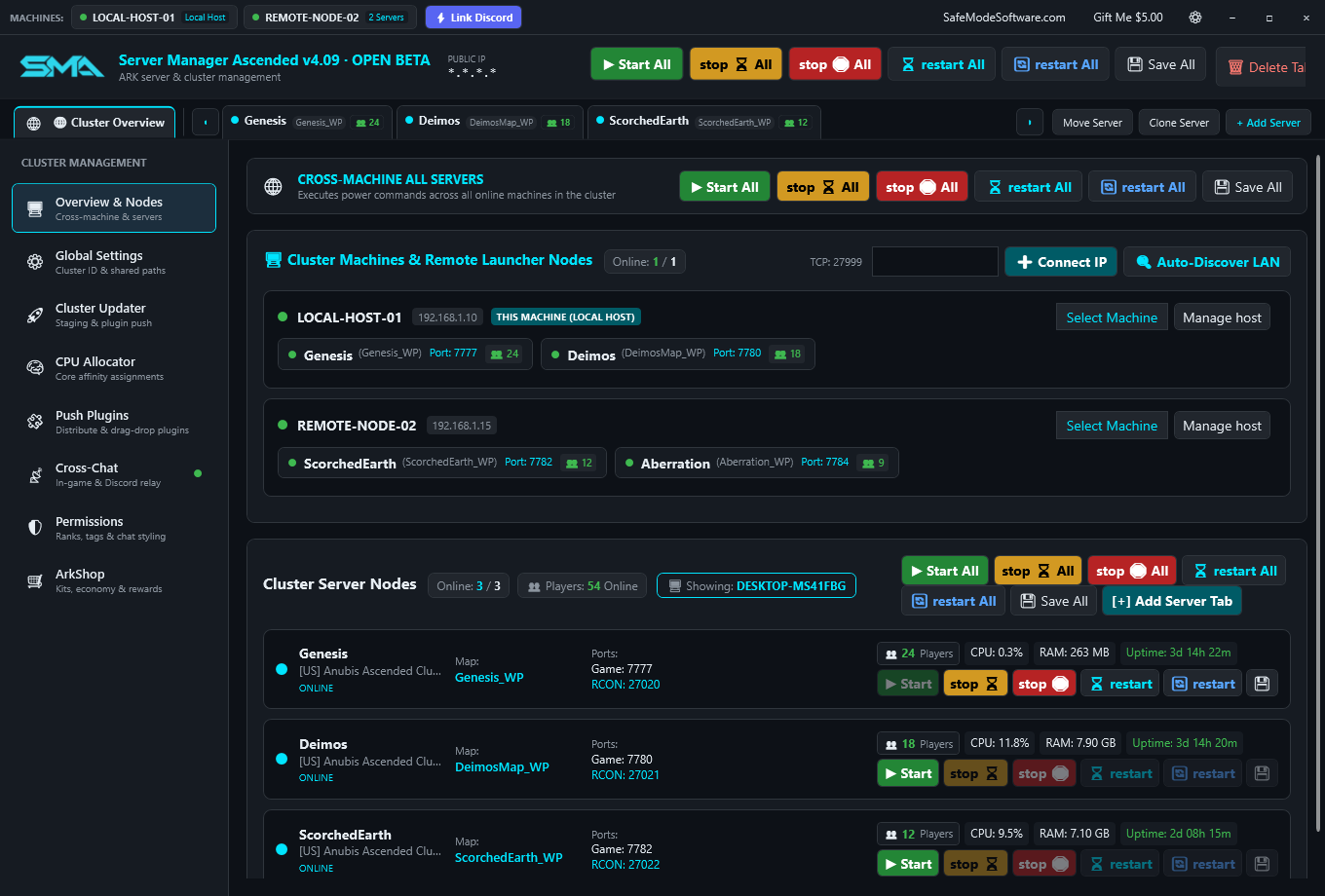
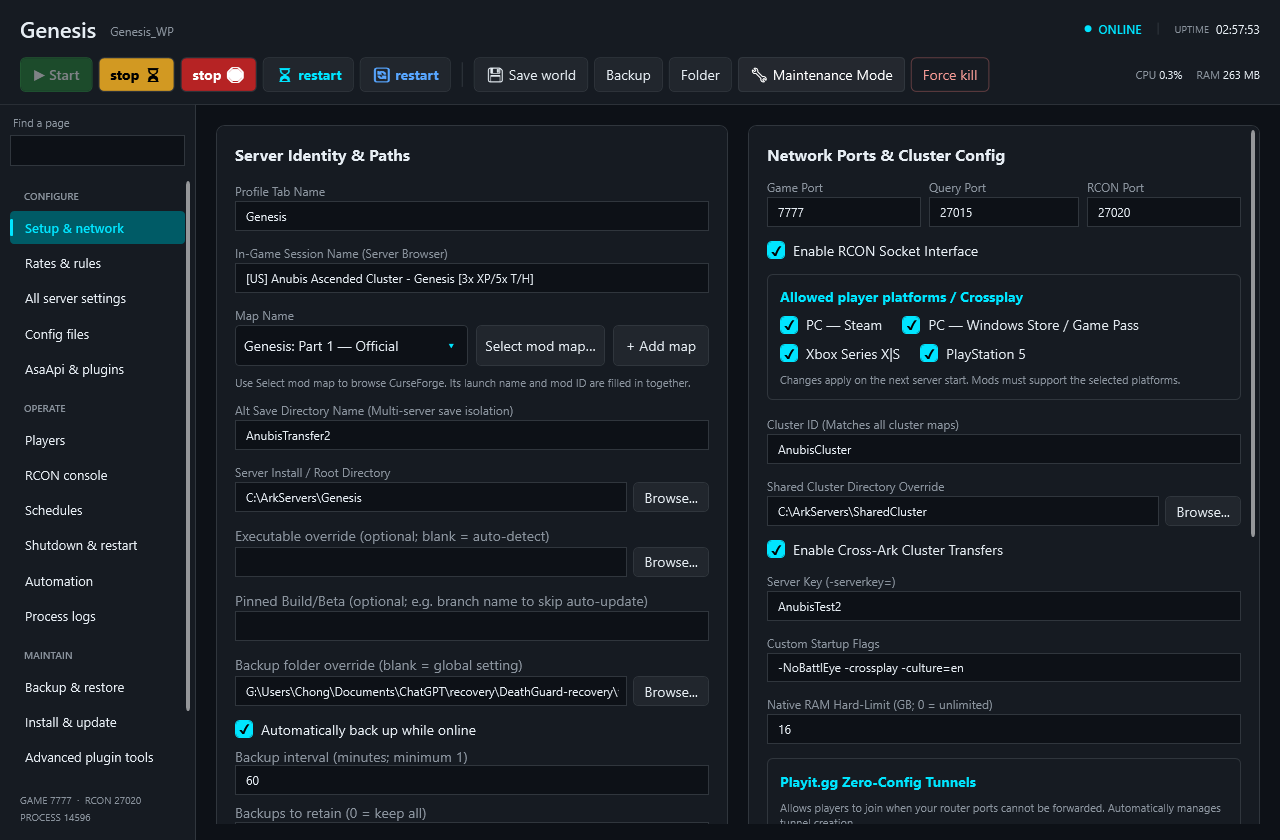
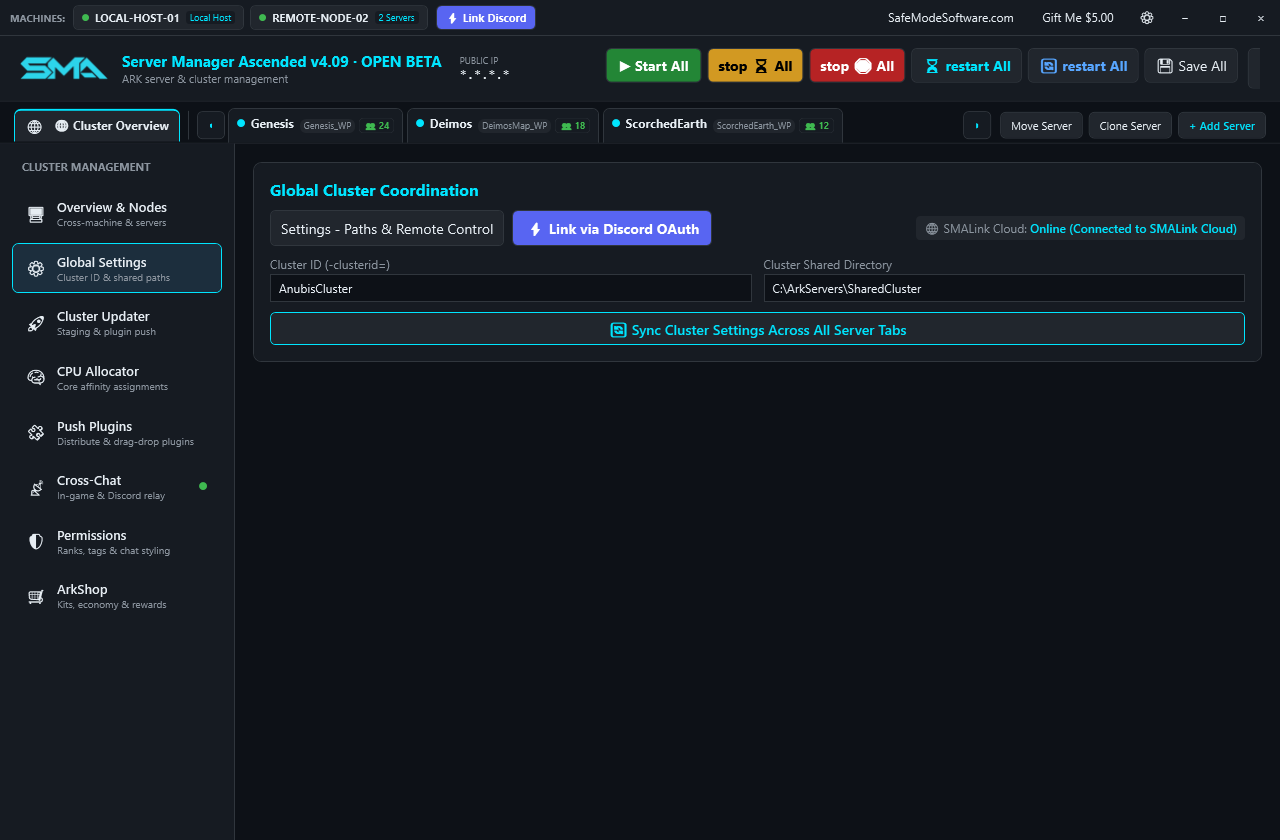
See the host. Control the cluster.Live cluster player tracking, multi-machine top bar selector, visual CPU affinity, Playit.gg tunnels, Cross-Ark cluster syncing, and single-download update distributor. Select image to view full size.
Everything your cluster needs
Architected for scale. Built for administrators.
From single-node survival to complex cross-datacenter multi-machine clusters, Server Manager Ascended eliminates repetitive administrative work with native automation.
PRO
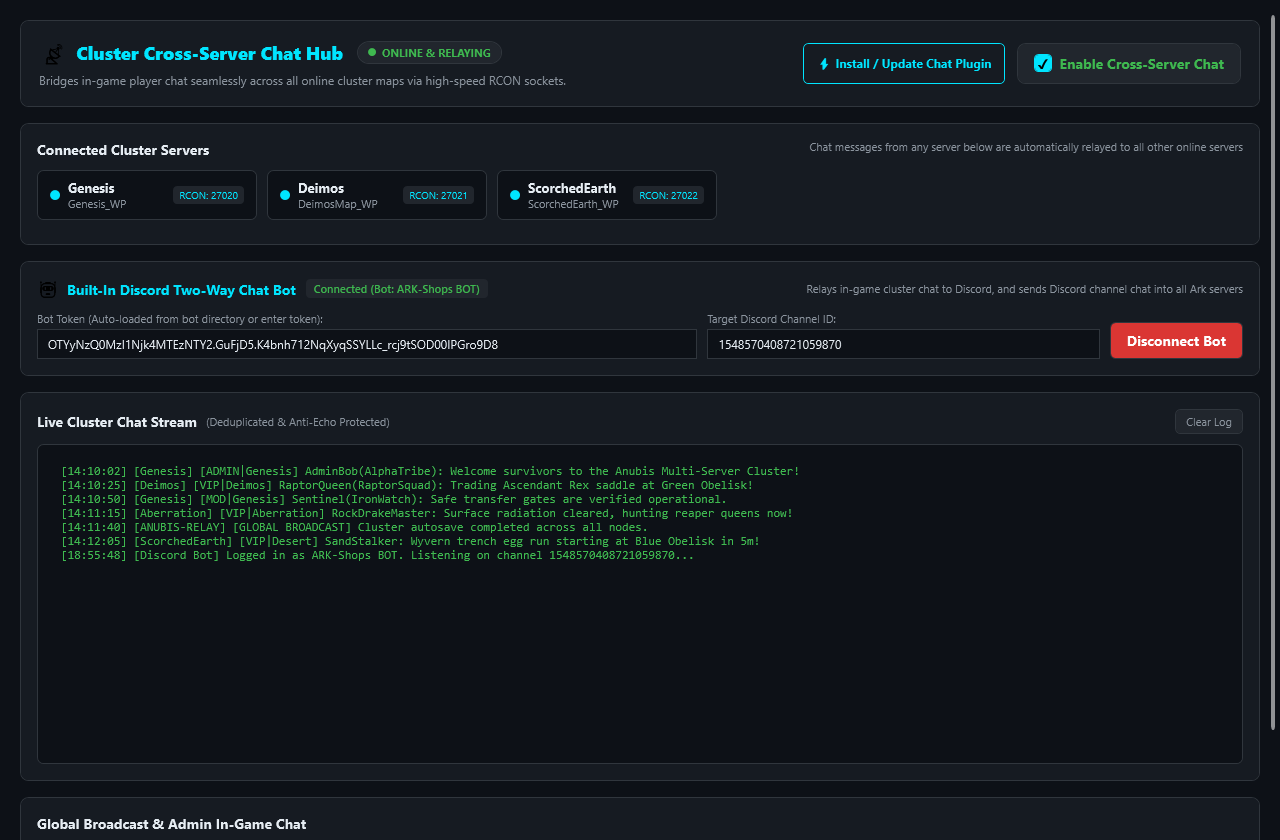
Cross-Cluster Chat Hub & Discord Two-Way Bot
Keep your entire player base connected across all maps. The built-in cross-cluster relay routes in-game chat over high-speed RCON sockets with anti-echo protection. Includes a two-way Discord bot bridge so community members can chat between Discord and your ARK servers in real time.
Included with SMA ProBuilt-in Discord botDual-color formattingQuick admin macros
PRO
Playit.gg Zero-Config Tunnels & Instant WAN Joining
Host joinable servers on the public internet without port forwarding or fighting carrier-grade NAT (CGNAT). SMA integrates Playit.gg tunnels natively with 1-click activation and claim URL generation, establishing secure encrypted anycast UDP tunnels for Game and Query ports so players can connect from anywhere.
Playit.gg zero-config tunnelsNo port forwardingCGNAT bypass1-click tunnel startEncrypted UDP anycast
PRO
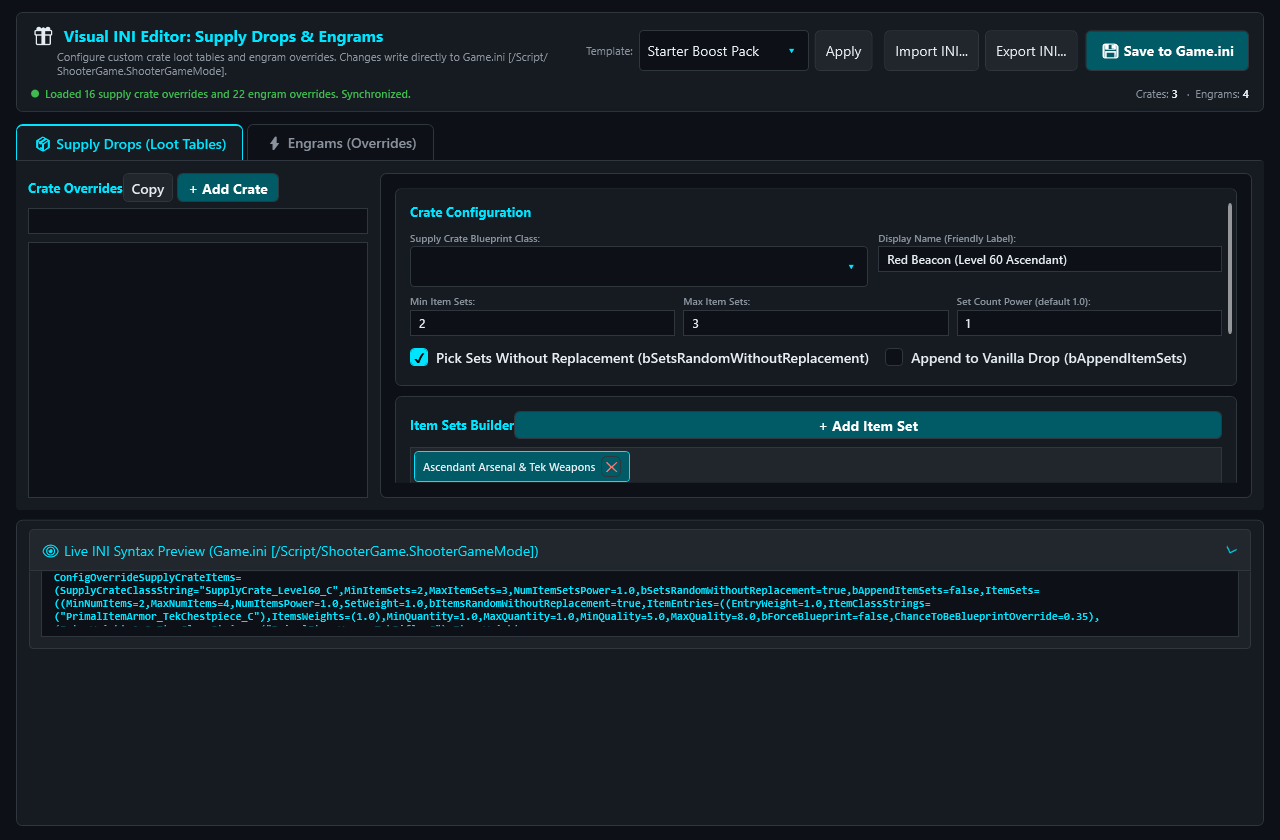
Visual INI Editors for Beacons & Engram Overrides
Full control over your server economy and game progression without wrestling with manual INI formatting. The dedicated Visual INI Editors provide interactive GUIs to customize Supply Crate Loot Drops (beacons) with item sets, weights, and quality ranges, as well as Engram Overrides for disabling, reordering, and re-pricing engrams directly into Game.ini.
Visual INI editorsSupply drop beacon tablesEngram overridesGame.ini syntax validationZero syntax errors
FREE
3-Tier Mod Management Architecture (Active, Passive, Disabled)
Enterprise-grade mod organization built for Ark Survival Ascended stability. SMA segregates CurseForge mods into three distinct tiers: Active Mods (injected directly into the command-line launch arguments), Passive Mods (cached on local disk storage, ready for instant activation without redownloading), and Disabled Mods (archived and completely ignored). Features full thumbnails and dependency resolution.
3-Tier Mod ManagementActive ModsPassive ModsDisabled ModsCurseForge browserVisual thumbnails
Effortlessly coordinate multi-map clusters. With 1-click Cross-Ark Cluster Syncing, push your rates, harvesting multipliers, taming/breeding configs, and shared cluster storage directory across every server profile in your fleet simultaneously. Guarantees consistent survivor and dino transfer mechanics with zero configuration drift.
Visual CPU Affinity Masking & Native RAM Hard-Limits
Protect host stability under heavy dino counts and peak player traffic. Pin server instances to specific processor cores using a visual 64-core CPU affinity matrix, and enforce kernel RAM hard-limits via Windows Job Objects. Restricts runaway memory leaks and eliminates catastrophic host out-of-memory (OOM) operating system crashes.
Native RAM hard-limitsWindows Job ObjectsVisual CPU affinityUp to 64 coresOOM crash prevention
PRO
Player Profile Restores & Automated Watchdog Recovery
Restore an extracted survivor .arkprofile backup while the server is stopped. SMA keeps the previous player file as a recovery copy and blocks restoration during server startup or other maintenance. Local ZIP backups and the crash watchdog help protect your server data.
Player profile restoresStopped-server restorePrevious file retained5-second crash auto-restartCompressed ZIP backups
FREE
Multi-Machine Top Bar Selector & 1-Click Discord Pairing
Control a distributed fleet of physical servers from one window. The window caption bar features an integrated machine node selector. Pair remote machines in seconds using Discord OAuth or a secure machine key without opening router ports for manager communication.
Caption bar machine switcher1-click Discord OAuthRemote node controlsNo manager port forwarding
FREE UPDATES · PRO PLUGIN DISTRIBUTION
Single-Download 30GB Update & Plugin Distributor
Save hundreds of gigabytes of download quota and hours of downtime. SMA downloads the massive 30GB+ Ark Survival Ascended server update once into local staging storage, then distributes binaries to all stopped local installations instantly. Easily replicate AsaApi plugins and configurations across your cluster with one click.
Saves 30GB+ per serverLocal staging cachePlugin config synchronizerInstant rollout
FREE
455-Setting Comprehensive Engine & Direct INI Synchronization
Configure every detail of your server without touching text files. The dedicated configuration catalog covers 455 Ark Survival Ascended options organized by category with instant live search. Cleanly tracks custom overrides while letting vanilla options rely on the game's native defaults.
Instant player visibility everywhere. The Cluster Overview shows total active survivors across all servers (👥 Cluster Players: 24 Online), while each server ribbon tab and card displays live player badges, status colors, and active player rosters with Steam IDs.
Cluster player totalPer-server tab badgesLive player rostersRCON player kick & ban
FREE CORE · PRO FEATURES REQUIRE PRO
SMALink Web Companion & Mobile Cloud Relay
Full cluster control from any mobile device, tablet, or web browser. Start, stop, save, view console logs, and issue RCON broadcast commands anywhere in the world through authenticated cloud relay.
Built-in Permissions Manager & Nameplate Color Picker
Fully integrated ASA Permissions management. Visually manage permission groups, assign custom chat nameplate colors via the built-in color picker, and easily grant or revoke specific command tokens without touching raw JSON files.
ASA PermissionsNameplate Color PickerVisual JSON editingPermission groups
PRO
Integrated ArkShop Management & Economy Controls
Complete control over your server's in-game economy. Manage the built-in ArkShop system directly from the launcher to configure points, kits, item prices, and player balances effortlessly.
Take full control of your player base. Beyond simple kicks and bans, utilize dedicated UI panels to manage AllowedCheaterSteamIDs.txt (whitelist) and BanList.txt, complete with live player roster tracking and EOS ID support.
Whitelist UIBanlist UILive roster trackingEOS ID support
FREE WORLD RESTORE · PRO BACKUPS & PLAYER RESTORE
Scheduled Zip Backups & Stopped-Server Recovery
With SMA Pro, create manual backups or automate compressed ZIP backups on customizable schedules. Stop the server before restoring a world or player profile. Recovery copies preserve the previous data in case you need to undo a restore.
Scheduled zip backupsStopped-server restoresPlayer recoveryCustom schedules
Keep your community connected inside and outside the game. Natively integrates a custom Discord bot to provide live 2-way crosschat between Discord and your Ark servers. Broadcast messages with custom sender names, track join/leave events, monitor real-time kill logs, and receive critical watchdog crash alerts instantly.
No more manual firewall wrestling. SMA automatically injects and manages inbound and outbound UDP/TCP rules directly into Windows Defender Firewall for each Ark Survival Ascended server instance, helping prepare the host; your router and network still need to allow access.
Auto Firewall RulesUDP/TCP InjectionWindows Defender
FREE MOVE & CLONE · PRO STAGING
1-Click Server Relocation & Cloning
Clone an Ark Survival Ascended server to create a secure staging environment, or use the dedicated Server Relocation Tool to safely move an entire server installation and its saves to a new hard drive without breaking paths or configs.
Server Relocation1-Click CloningStaging Environments
PRO WATCHDOG · FREE MAINTENANCE MODE
Smart Crash Watchdog & Maintenance Mode
SMA Pro can restart crashed servers and perform opt-in recovery after repeated health-check failures. Toggle Maintenance Mode to safely pause the watchdog during planned file edits so it doesn't trigger auto-heals while you work.
Claim it from License Key in the launcher. No automatic charge. One trial per Discord account, machine and public IP address. Attempting another trial on a used machine ends its trial access. After the trial, choose a paid plan or continue with Free.
Free — $0
Install, import, update and run servers; stop, restart and SaveWorld
Standard settings and INI editing, maps, mods and AsaApi setup
Logs, RCON, player administration and CPU affinity
Host pairing and basic SMALink remote controls
Restore existing world archives and retain protective maintenance copies
Pro — all advanced tools
Cross-chat and Discord relay; Permissions and ArkShop editors
SQL database setup, discovery and plugin configuration
Push Plugins, cluster settings sync and staging
Visual INI loot / engram editors, Playit integration and RAM limits
Backup creation, automations, schedules, crash recovery and player profile restore
Pro adds launcher tools; it does not replace the separate licenses or charges of third-party plugins and services. Basic AsaApi and bundled plugin installation remain part of the free core.
One key per cluster
Each paid key binds to one Cluster ID. Set one shared ID per host in Global Settings; server fields inherit it and cannot be edited individually. Conflicting profile files or launch arguments disable Pro until corrected. Use it on the hosts belonging to that same cluster. Buy a separate key for every different cluster; each purchase below can contain 1–25 individual keys.
One month
$5
USD per cluster key, paid once. One calendar month. No automatic renewal.
Upgrade early and keep your trial time. Sign in with the same Discord account: a one-month purchase adds its paid month after your trial, and a subscription schedules its first charge for the trial’s end. If fewer than 49 hours remain, subscription checkout adds a little extra free time. Exact dates and the total are shown before payment. Lifetime access never expires.
Keys purchased together on a subscription renew and cancel together. Purchase separate subscriptions if you need independent cancellation. Manage or cancel billing.
Pro includes up to 24 hours of grace after normal expiry or since the last successful verification during an outage. Revoked keys stop when detected. Free features remain available.
Visual Interface Tour
See the tools in action.
Designed with a purpose-built dark aesthetic optimized for readability during late-night maintenance sessions.
Pro Visual INI Editors & Free Settings EngineInteractive graphical editors for beacon loot drops and engram overrides, fast keyword search, and dual-file sync for GameUserSettings.ini & Game.ini.Pro Cluster Cross-Server Chat HubReal-time cross-server chat terminal, server status matrix, two-way Discord bot bridge, and admin macros.3-Tier Mod Management ArchitectureVisual management across Active Mods (injected), Passive Mods (cached locally), and Disabled tiers with CurseForge browser thumbnails.Pro Cluster Sync, RAM Limits & Playit.gg Tunnels1-click synchronization of cluster rates and settings across all nodes, zero-config Playit.gg tunnels, and native RAM hard-limits.
New to Server Manager Ascended?
Master Setup & Operations Guide
Learn how to set up your first server, link remote machines via Discord, configure cross-server chat, and avoid 30GB update download traps in our comprehensive step-by-step master tutorial.
Keep maintenance close at hand, whether you're making a quick multiplier change or rolling out a major Ark Survival Ascended patch.
Send administrative and broadcast commands through integrated RCON.
Use SMA Pro to create manual or scheduled backups. Existing archives remain restorable without Pro.
Configure CPU thread affinity masks across up to 64 cores per machine.
Use SMA Pro cross-chat for two-way Discord chat and notifications.
Queue SteamCMD downloads automatically across multiple server instances.
Remotely monitor and control cluster state from your phone via SMALink.
A portable start
Unzip. Launch. Make it yours.
No separate .NET runtime installation is needed. The Windows x64 package includes everything embedded.
This is an OPEN BETA release. Review your settings and test your cluster configuration before opening it to live players.
Download and extract
Download the free ZIP and extract the contents into a dedicated folder (such as D:\ARK_Servers\SMA\). Launch ServerManagerAscended.exe.
Create new or use existing
Click [+ Add Server]. Choose Create new to automatically download SteamCMD, install clean server files, and allocate unique network ports. Choose Use existing to import an existing server folder instantly without redownloading files.
Customize, cluster and launch
Configure your maps, adjust multipliers in the 455-setting engine, use Pro to build custom beacon drop tables with Visual INI editors, organize Active and Passive mods with 3-Tier Mod Management, use Pro Playit.gg integration where supported by your Playit plan, and set your shared cluster directory. Once online, link remote machines with Discord or open the SMALink Web Companion to monitor your world on the go.
Can I host an ASA server without router port forwarding?
With SMA Pro and a compatible Playit.gg plan, built-in tunnels, SMA automatically sets up encrypted anycast UDP tunnels for Game and Query ports. Players on the public WAN can connect directly using your tunnel address without configuring router port forwards or battling CGNAT.
How do the Visual INI editors for loot drops and engrams work?
SMA Pro provides dedicated interactive graphical editors for Supply Crate / Loot Drop Beacons and Engram Overrides. You can adjust item sets, quality ranges, weights, and engram costs directly through an intuitive UI that writes valid syntax straight into Game.ini without manual file editing.
What is 3-Tier Mod Management?
SMA organizes your CurseForge mods into three operational tiers: Active Mods (injected into the server command line), Passive Mods (downloaded and cached to disk, ready to activate), and Disabled Mods (archived). This allows instant mod testing and event configuration with 1-click tier switching.
How do Native RAM Hard-Limits and Player Profile Restores protect my cluster?
Native RAM Hard-Limits use Windows Job Object kernel ceilings to cap memory per server instance, helping control memory use; exceeding the limit can terminate that server. Player Profile Restores require the server to be stopped, then replace the selected player file while retaining the previous file for recovery.
How does the built-in cross-chat relay work?
The SMA Pro relay connects directly to each server's local RCON port and routes messages across all active maps in your cluster. It also supports 1-click deployment of the native SmaTools plugin for dual-color in-game chat rendering, and includes a built-in Discord bot bridge for two-way communication.
How does the single-download 30GB update distributor save bandwidth?
Normally, updating 4 servers via SteamCMD downloads 30GB+ four separate times (120GB+ total). SMA downloads the update once into local machine staging, then rapidly mirrors the updated binaries to all server instances on that machine in seconds.
How does multi-machine Discord linking work?
Click Link Discord in the top window header on each computer. Once authenticated, SMA connects your machines through the secure SafeMode Cloud Relay, letting you switch between and control different host PCs directly from the top bar dropdown without port forwarding.
What are the system requirements?
A 64-bit Windows PC (Windows 10, 11, or Windows Server). The portable ZIP is self-contained and includes the embedded runtime. ASA server files, mods, and backups require dedicated disk space (SSD/NVMe recommended).
Does the editor cover all ASA settings?
The editor provides a curated catalog of 455 settings across GameUserSettings.ini and Game.ini with live keyword search. You can also add custom INI keys at any time.
What is the SMALink Web Companion?
SMALink (safemodesoftware.com/SMALink) is a responsive web dashboard that connects to your running manager via authenticated cloud relay. It lets you monitor player counts, check CPU/RAM usage, start/stop servers, and send RCON commands from your smartphone or laptop.
Credit where it belongs
Built to work with the community.
Permissions and ArkShop are third-party projects. Their official resource pages list Pelayori. Credit belongs to Pelayori and the upstream contributors. SafeMode Software did not develop these plugins and does not claim their authorship.
Bundled plugin builds are older builds from MIT-licensed source, not the latest forum binaries. Their separate third-party MIT licenses apply to those plugin components.
The Server Manager Ascended launcher is not MIT-licensed. See the included license notices and SafeMode EULA for the applicable terms. Integration does not imply endorsement by Pelayori, the upstream contributors, or the ARK developers.